Apparel ERP data quality is the fitness of apparel-related records for the decisions and workflows that depend on them. Reliable data is sufficiently complete, consistent, accurate for its intended use, current, traceable, and governed by clear ownership. When style numbers, material codes, sizes, quantities, revisions, or supplier details are unreliable, the resulting problem is operational: people may purchase, plan, produce, inspect, or ship against different interpretations of the same product. Apparel Wiki is an independent educational publication; readers can learn more about supporting its work on the Sponsor page.
In practical terms, apparel ERP data quality affects every record that helps a team make or execute a product decision. It includes master data such as styles, colors, size scales, materials, suppliers, customers, and bills of materials. It also includes transactional data such as purchase orders, receipts, inventory movements, production orders, inspection results, and shipments; workflow data such as approvals and revision states; and reference data such as units, codes, calendars, and controlled value lists.
A data-entry error is only one kind of failure. A more difficult problem is a semantic mismatch: two teams may use the same color name, material label, or size description while intending different specifications. Conversely, they may use different labels for the same thing and create duplicate records. An ERP can store both situations successfully. Software automation does not decide which meaning is correct, nor does it assign ownership when the organization has not documented either.
ERP, product lifecycle management (PLM), manufacturing execution (MES), and warehouse management (WMS) systems may support different parts of a product journey, but their practical boundaries can overlap by product and implementation. Teams should therefore define responsibility by process and data ownership rather than assuming that a software name settles the question. For example, one team may own the approved material definition while another maintains the transaction that consumes it. The important question is who defines, approves, changes, and retires each record.
What Is Apparel ERP Data Quality?
Good apparel ERP data allows a user to identify the intended product, understand its current requirements, and use the record consistently in the relevant process. “Accurate” does not mean every field has one permanent value; a seasonal price, supplier, measurement, or packaging instruction may change. It means the value is appropriate for the stated purpose and version, with enough context to explain when it applies.
Completeness is also contextual. A style record might be sufficient for an early concept review but inadequate for purchasing if it lacks the approved material, unit, supplier attribute, or revision status. Traceability connects related records and changes so a user can determine which specification, approval, or transaction is current. These qualities should be assessed against real apparel decisions, not only against whether a record passes a technical import.
Which Apparel ERP Data Problems Cause the Most Damage?
The most damaging problems are usually those that alter identity, relationships, quantities, or version status. A duplicate style, color, size, material, supplier, or customer record can split activity across several entries. One purchase order may reference one material code while a costing sheet, inventory record, or production instruction uses another. The records can each look reasonable in isolation while the overall product history becomes difficult to reconcile.
Incomplete product records create a different risk. A bill of materials may omit a component or use an unclear quantity. A specification may lack a measurement, unit, tolerance, or approval state. Supplier records may omit attributes needed for sourcing or compliance review. Pack information may be missing or expressed without a clear unit. These gaps can remain hidden until a downstream team needs to turn product information into an order, operation, receipt, or inspection decision.
Inconsistent naming and coding multiply the problem across teams and systems. Common examples include different abbreviations for the same fabric, mixed units of measure, color names that do not follow a controlled convention, or size scales that appear similar but represent different grading structures. An outdated record can be equally serious when it remains active after a material substitution, supplier change, product revision, or style cancellation.
Version and relationship failures deserve particular attention. Missing effective dates, revision history, approval status, or links between superseded and current records make it difficult to establish which instruction should govern a transaction. Data exchanged through spreadsheets, imports, exports, or integrations may also be duplicated, incompletely mapped, or assigned to the wrong field. A file opening successfully proves only that the file was readable; it does not prove that identity, dimensions, materials, versions, units, or other meaning survived the exchange.
- Identity problems: duplicate or conflicting style, color, size, material, supplier, or customer records.
- Content problems: missing specifications, components, measurements, quantities, units, pack details, or supplier attributes.
- Consistency problems: incompatible names, codes, units, size scales, or local definitions.
- Currency problems: active records that no longer reflect an approved revision, supplier, material, or style status.
- Traceability problems: missing approvals, effective dates, revision links, or relationships between product and transaction records.
- Exchange problems: duplicate, incomplete, or incorrectly mapped data moving between systems and files.
How Poor ERP Data Disrupts Apparel Operations
Consider a representative chain in which a material record identifies the wrong construction or an obsolete supplier. Sourcing may request an unsuitable quotation, procurement may create a purchase order against the wrong item, and production may receive instructions that do not match the approved product. Inventory transactions can then be recorded under a different material identity from the one used in costing or planning. Later, inspection and shipment records may preserve the same inconsistency rather than reveal its original source.
Conflicting versions create a related failure. Product development may treat one specification as approved while production or quality works from an earlier revision. The resulting symptoms can include repeated approval requests, manual reconciliation, blocked transactions, unexplained inventory differences, or instructions being checked outside the ERP. These symptoms indicate where investigation should begin; they do not prove that ERP data is the only cause.
Supplier capability, planning decisions, workmanship, equipment, training, and process design can produce similar operational outcomes. A disciplined review separates the data-quality contribution from those other factors. Teams should ask which record was used, which version was effective, who approved it, and whether the downstream transaction preserved the intended identity and unit.
Quality analysis also requires explicit counting definitions. A record of 18 defects is not automatically equivalent to 18 garments affected, because one garment can contain multiple defects. Comparisons should state the inspected population, the unit being counted, the defect classification, and the inspection method. Without those definitions, a change in reported numbers may reflect a change in counting practice rather than a change in product quality.
Why Apparel ERP Data Becomes Unreliable
Many apparel ERP data problems begin outside the ERP screen. Ownership may be unclear between design, product development, merchandising, sourcing, procurement, production, quality, and finance. If no one is accountable for defining a material, approving a revision, retiring a supplier record, or maintaining a size-scale definition, users may make reasonable local decisions that conflict at the enterprise level.
Uncontrolled spreadsheets, manual rekeying, copied templates, local naming conventions, and informal approvals create additional paths for divergence. Late changes and compressed sample or production schedules make incomplete handoffs more likely. A team may update a specification but fail to communicate the effective date, or revise a supplier detail without identifying which open orders are affected. The issue is not simply that someone typed incorrectly; the process allowed an important meaning or change to remain ambiguous.
Weak validation can let the same class of error recur. Required fields may be technically populated but still too vague to support a decision. Dropdown values may contain overlapping meanings, units may be optional, and exception handling may be undefined. Integration mapping, legacy migration, duplicate creation, and process changes after implementation can add further inconsistencies. These conditions should be examined as governance and process questions, not treated only as database-cleaning tasks.
Correcting an existing record is remediation. Preventing recurrence requires a separate control: a defined owner, a clear business meaning, an approval or change rule, and a way to detect exceptions. The specific owner, validation rule, and approval step depend on the organization. What matters is that the responsibility is explicit and aligned with the process in which the data is created and used.
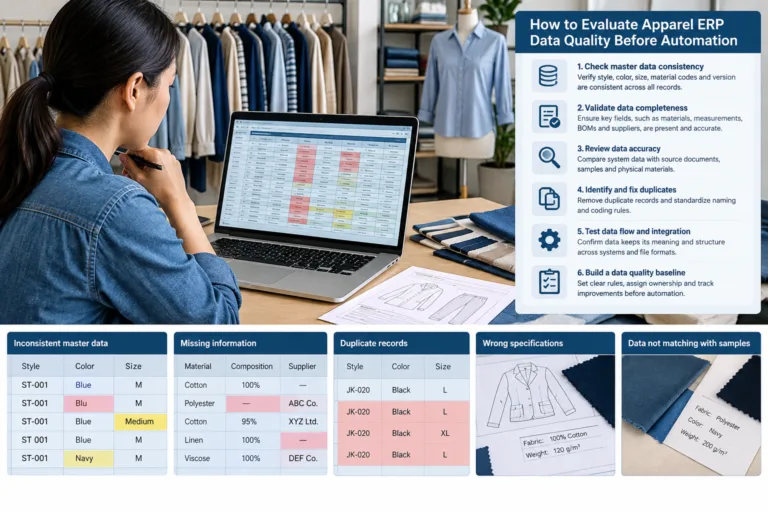
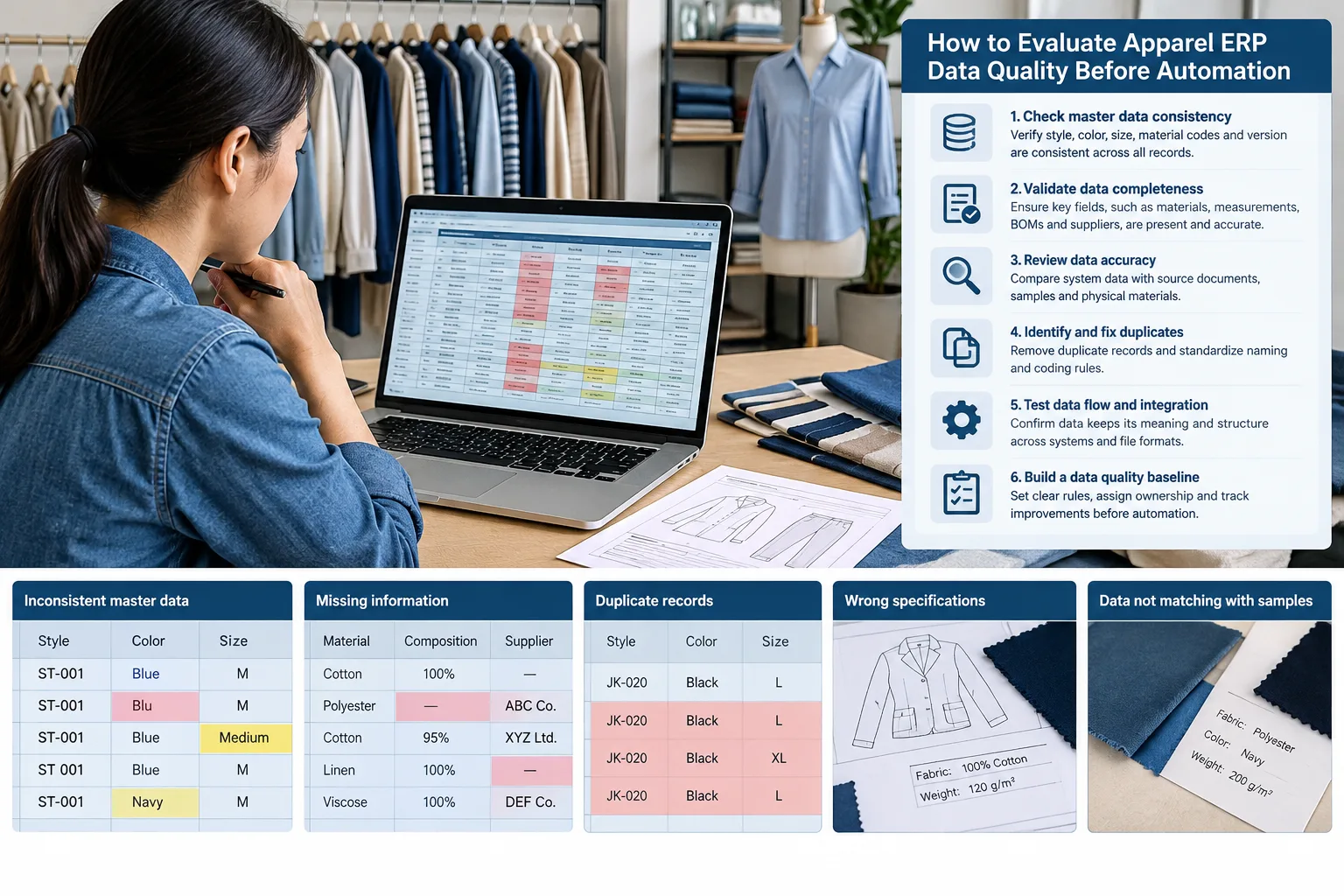
How to Evaluate Apparel ERP Data Quality Before Automation
Begin with the business decision, not the software screen. Identify whether the data supports material purchasing, costing, production instructions, inventory control, inspection, order fulfillment, or another defined activity. The same field may be acceptable for one use and insufficient for another. For example, a material description used for a discussion may not be precise enough for purchasing or production execution.
Create a practical data dictionary for each important data set. Record the field meaning, format, unit of measure, allowed values, source, owner, revision status, and effective date where these apply. Include relationships between records, such as the connection between a style, its colorways, size scale, bill of materials, supplier, and approved revision. This exposes ambiguous definitions before they become automation rules.
Next, profile representative records rather than relying on a clean demonstration sample. Look for duplicate style, color, size, material, supplier, and customer records; missing or invalid values; conflicting units; stale versions; and broken relationships. Include records from different seasons, teams, suppliers, and production stages when those differences affect how data is created or used.
Trace selected records through the actual information chain. A style may begin in product development, move into purchasing and production instructions, appear in inventory transactions, and later connect to quality and shipment records. At each handoff, check whether identity, dimensions, materials, quantities, units, revision status, and approval meaning remain available and understandable. A file opening successfully does not demonstrate that the business meaning survived the exchange.
Testing should include complex cases, not only simple styles. Use multiple colors, different size scales, material substitutions, supplier changes, revised specifications, partial orders, and changed orders where those situations occur in the business. Test import, editing, export, return, exception handling, and recovery from rejected or incomplete records. Document each exception, assign a remediation owner, define acceptance criteria, and retest after corrections.
For a pilot, establish a baseline for comparable tasks and observe the same type of work after the change. Consider data quality alongside task time, training, integration effort, maintenance, and manual review. The purpose is to understand the complete operating effect, not to claim a universal target or guaranteed return on investment.
How to Prevent Data Quality Problems After ERP Cleanup
Cleanup is a remediation activity; it does not automatically change the process that created the error. Assign named owners for critical data domains and state who may create, approve, change, retire, and restore records. Ownership should follow the process and business meaning of the data. The appropriate owner for a material definition may differ from the person responsible for maintaining a supplier contact.
Use controlled vocabularies, duplicate checks, required fields, validation rules, and explicit units where they support the workflow. These controls should prevent ambiguity without encouraging users to enter placeholder values merely to pass a required-field check. A system capability is not the same as a configured control, and neither replaces an organizational rule about who is accountable for the decision.
Maintain revision history, effective dates, approval states, and links between current and superseded records. When a measurement, material, size scale, supplier, packaging detail, costing input, or production instruction changes, the process should identify which related records and open transactions may be affected. Change-control triggers should be defined before urgent revisions make informal communication the only safeguard.
Monitor exceptions and recurring error patterns instead of waiting for a periodic database cleanup. Useful review questions include which fields are repeatedly corrected, where duplicate records originate, which integrations produce unresolved exceptions, and which teams depend on local spreadsheets to complete routine work. The answer may require a data correction, a workflow change, a mapping review, clearer training, or a different process definition.
Training should explain business meaning and handoff responsibilities, not only which buttons to click. Users need to understand why a version, unit, approval state, or effective date matters to the next team. After a system, template, integration mapping, or process definition changes, review downstream records with representative cases. This helps distinguish a successful configuration change from one that merely completes without an error message.
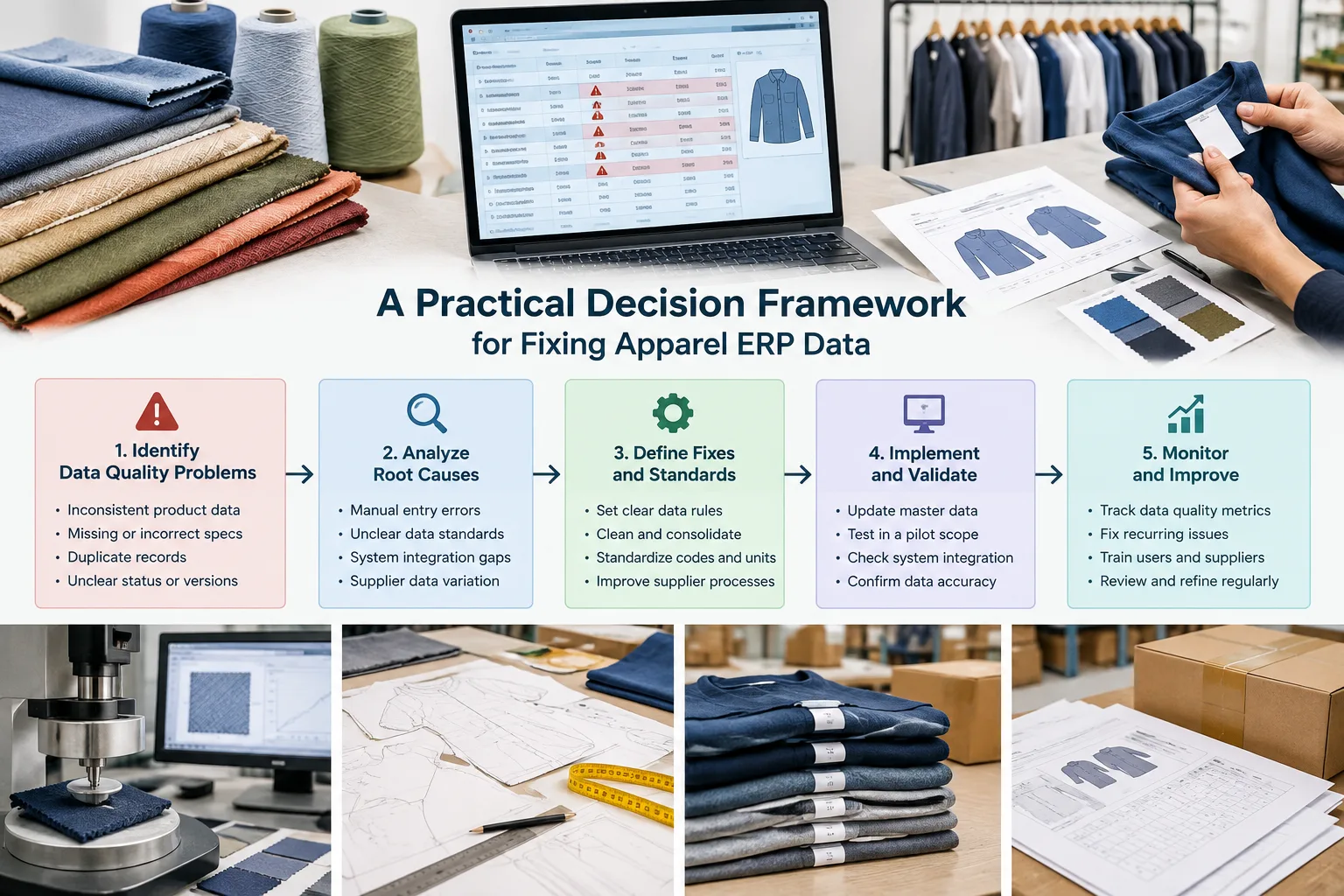
A Practical Decision Framework for Fixing Apparel ERP Data
Prioritize each issue by the process it affects, its business impact, frequency, detectability, accountable owner, and effort to correct. Identity and relationship problems usually deserve early attention because a wrong style, material, supplier, or revision link can make later reports and automation appear orderly while using the wrong underlying record. This is a prioritization principle, not a universal ranking for every organization.
Separate one-time migration cleanup from recurring controls. Removing duplicate colors from a legacy file may resolve an immediate problem, but it will not prevent duplicate colors from being created next month. The longer-term response may involve controlled values, approval rules, permissions, training, integration changes, or a documented naming decision. Record these as separate actions so completion of the cleanup is not mistaken for resolution of the cause.
Use a small pilot with a defined baseline, representative records, an observation period, and clear exit conditions. Include difficult cases and normal work, then compare data quality, task time, implementation and maintenance effort, user adoption, and exception handling. A vendor demonstration can illustrate a possible capability, but it is not evidence of production results or return on investment for a particular apparel business.
When definitions or ownership remain unresolved, delay automation of that decision and resolve the process question first. Automating an ambiguous size scale, material status, or approval state can make disagreement faster and harder to trace. Where the meaning is clear but records are unreliable, prioritize remediation and testing. Where the meaning, owner, or change rule is unclear, prioritize governance and process design.
Next step: Choose one business-critical record chain, such as style to material to supplier to purchase order, and document its definitions, owners, versions, handoffs, and exceptions. That focused review can reveal whether the next investment belongs in data cleansing, governance, integration testing, workflow configuration, or user training.
What does data quality mean in an apparel ERP system?
It means that product, transaction, workflow, and reference data is sufficiently complete, consistent, accurate for its intended use, current, traceable, and governed to support real apparel decisions.
Which apparel ERP records should be cleaned first?
Start with records that affect high-impact decisions and relationships, such as styles, colors, sizes, materials, suppliers, bills of materials, revisions, units, and active transactions. Prioritize according to the organization’s processes and risks.
How do duplicate style, color, size, and material codes affect apparel operations?
They can split purchasing, costing, inventory, production, quality, or fulfillment activity across records that users believe represent the same thing. The effect depends on how those records are connected and used.
Can an ERP system automatically fix apparel master-data problems?
Software may detect patterns, enforce configured rules, or support workflows, but it cannot independently decide whether two similar labels have the same business meaning. Definitions, ownership, approvals, and exceptions still require organizational decisions.
How should apparel teams test ERP integrations and data migrations?
Use representative and complex records, then trace identity, dimensions, materials, quantities, units, revisions, approval states, and relationships through import, processing, export, and exception recovery. Confirm meaning, not only file compatibility.
Who should own apparel ERP master data?
Ownership should be assigned to the role or team accountable for the business meaning and lifecycle of each data domain. Define separate responsibilities for creation, approval, change, retirement, restoration, and downstream use where necessary.